





AIPLAY App Turnover Reset Guide – Helps Every Member Understand How the Turnover Requirement Works and When It Resets So You Always Know Your Withdrawal Status
What Is the AIPLAY App Turnover Reset Feature? Uses a Turnover Requirement System to Ensure Fair Play Before Allowing Withdrawals on Every Deposit
The AIPLAY App Turnover Reset is an important feature within the mobile platform that governs how turnover requirements are managed when members transfer funds or make withdrawal requests. Turnover refers to the total effective betting amount a member must reach relative to their deposit before a withdrawal request will be approved on the AIPPLAY App. Understanding when your turnover resets — and how to control it using the Reset Turnover Requirement toggle within the App — ensures you are always in full control of your account status and withdrawal eligibility on your mobile device. Read the complete explanation below to understand exactly how the AIPPLAY App Turnover Reset feature works in all scenarios.
AIPLAY App Turnover Reset – Three Key Scenarios Explained
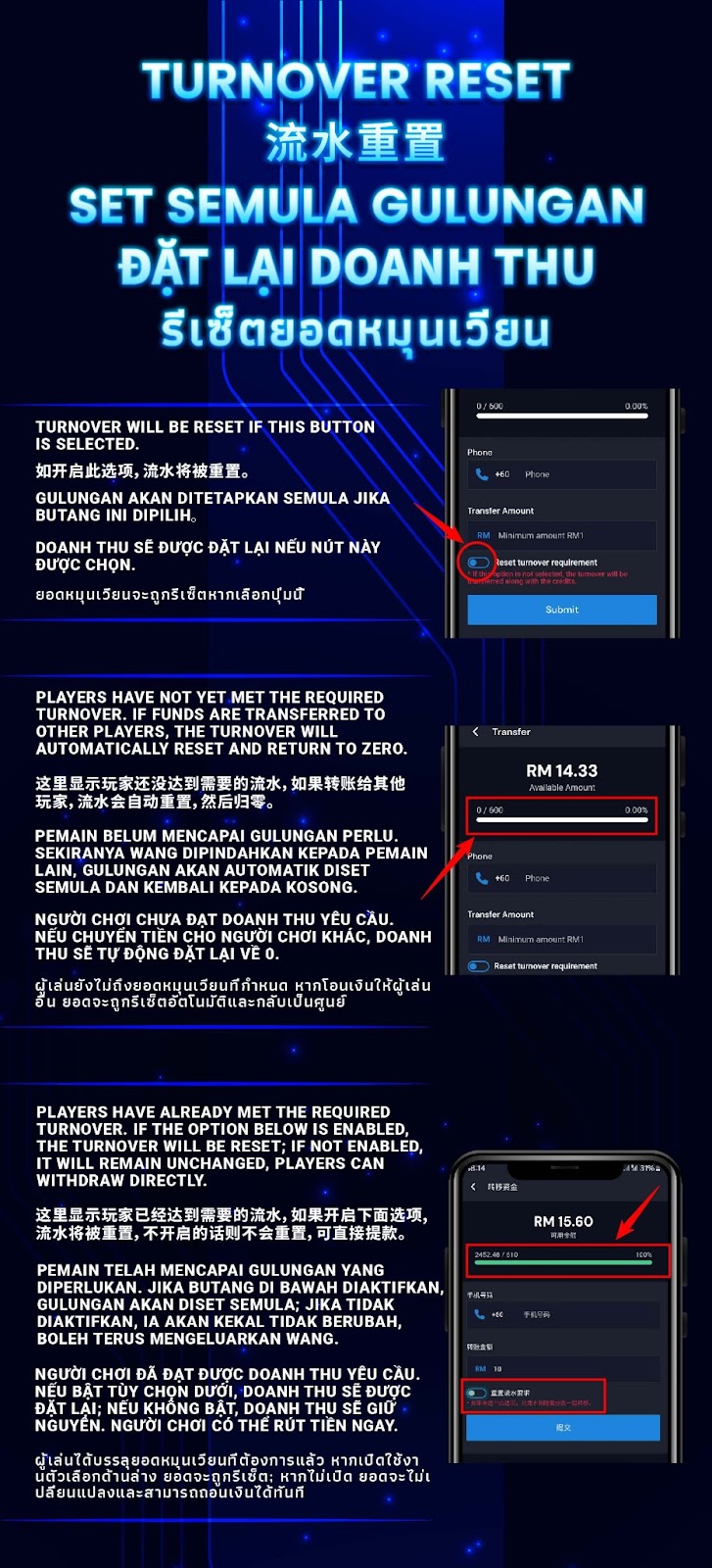
Scenario 1 – Turnover Resets When You Enable the Reset Turnover Requirement Toggle
When making a transfer on the AIPLAY App, you will see a "Reset turnover requirement" toggle option on the Transfer screen within the mobile interface. If this toggle is enabled on your mobile device before you tap Submit, the turnover requirement for your account will be reset along with the transfer. This means any turnover progress you have accumulated on the AIPPLAY App will be cleared and the turnover requirement will start fresh. Members should use this option carefully on the App — once the toggle is enabled and the transfer is submitted, the previous turnover progress cannot be recovered.
Scenario 2 – Turnover Automatically Resets to Zero If You Have Not Yet Met the Required Turnover
If a member has not yet met the required turnover on the AIPLAY App — meaning the turnover progress bar on their mobile screen shows less than 100% completion — and they transfer funds to another player or account through the App, the turnover will automatically be reset to zero. This automatic reset within the AIPPLAY App applies regardless of whether the Reset Turnover Requirement toggle is enabled or disabled on the mobile interface. Members who are still in the process of meeting their turnover requirement on the App should be aware that any outgoing transfers will clear their accumulated turnover progress and require them to start again from zero on the AIPLAY App.
Scenario 3 – When You Have Already Met the Required Turnover
If a member has already met the required turnover on the AIPLAY App — meaning the turnover progress bar on their mobile device shows 100% completion — the behaviour of the Reset Turnover Requirement toggle within the App determines what happens next. If the toggle is enabled on the mobile screen, the turnover will be reset after the transfer. If the toggle is disabled on the AIPPLAY App, the turnover will remain unchanged and the member can proceed directly to make a withdrawal without any interruption. Members who have completed their turnover on the App and wish to withdraw should ensure the Reset Turnover Requirement toggle is turned off on their mobile device before submitting any transfer to preserve their withdrawal eligibility.
How to Read Your AIPLAY App Turnover Progress
Understanding the Turnover Progress Bar
The AIPLAY App Transfer screen displays a turnover progress bar at the top of your mobile screen showing your current turnover completion status — for example 0 / 500 at 0.00% when no turnover has been accumulated, or 2452.48 / 610 at 100% when the required turnover has been fully met within the App. The left number on your mobile device represents your accumulated effective betting turnover and the right number represents the total turnover required to qualify for withdrawal on the AIPPLAY App. Monitoring this bar regularly on the App helps you understand exactly how close you are to meeting your withdrawal eligibility at any given time.
Available Amount & Minimum Transfer
The Transfer screen on the AIPLAY App also displays your Available Amount on your mobile device — the total credit balance available in your main wallet for transfer. The minimum transfer amount on the AIPPLAY App is RM 1. When entering a transfer amount on the App, always review your turnover progress bar status and the Reset Turnover Requirement toggle setting on your mobile screen before tapping Submit to ensure your turnover is managed exactly as intended.
Important Reminders About AIPLAY App Turnover Requirements
Turnover Must Equal Your Deposit Amount Before Withdrawal
The AIPLAY App requires members to achieve a minimum effective betting turnover equal to the amount deposited before a withdrawal request will be approved through the mobile platform. For example, if you deposited RM 500, your effective betting turnover on the App must reach at least RM 500 before you are eligible to withdraw. This policy within the AIPPLAY App ensures fair use of all deposited funds and helps maintain the integrity of the promotion and bonus system for all mobile members.
Transfers to Other Players Will Reset Incomplete Turnover
Any transfer of funds from your AIPLAY App account to another player's account through the mobile interface while your turnover requirement has not yet been completed will result in an automatic reset of your turnover progress to zero on the App. This is an important policy to be aware of on the AIPPLAY App before making any inter-player transfers, particularly if you are currently working toward meeting a turnover requirement linked to a recent deposit or bonus claim.
Disable the Toggle If You Have Met Turnover and Want to Withdraw
If you have already met your AIPLAY App turnover requirement and intend to withdraw your balance through the mobile platform, always ensure the Reset Turnover Requirement toggle is set to OFF on your mobile device before submitting any transfer. Leaving the toggle enabled on the App when your turnover is already complete will reset your turnover status unnecessarily and may require you to replay the required turnover amount before your next withdrawal request can be processed on the AIPPLAY App.
Need Help Understanding Your Turnover Status on the AIPLAY App?
If you have any questions about your AIPLAY App turnover requirement on your mobile device — including how to read your progress bar, why your turnover was reset within the App, or whether you are currently eligible to withdraw — the AIPLAY customer support team is available 24 hours a day, 7 days a week via Live Chat within the App to explain your turnover status clearly and help you take the right next step.
Understand Your AIPLAY App Turnover Status and Manage It Confidently – Contact Support If You Need Help
The AIPLAY App is committed to making every aspect of the mobile platform — including turnover requirements — transparent and easy to understand for every member on their device. Whether you have not yet met your turnover on the App, have just completed it, or want to understand how the Reset Turnover Requirement toggle affects your account within the mobile interface, the information above gives you everything you need to manage your AIPPLAY App turnover status with confidence. If you still have questions, the AIPLAY customer support team is available 24/7 within the App to help. Log in to the AIPLAY App now on your mobile and check your current turnover progress today.