





AIPLAY App Agent Guide – How to Add a New Downline Member – Gives Every Agent a Simple 4-Step Process to Grow Their Network Using a Unique Referral Link and QR Code
How Does the AIPLAY App Agent Referral System Work? Provides Every Agent with a Personalised Referral QR Code and Link to Register New Downline Members Instantly
As an AIPLAY App agent, growing your downline network is straightforward thanks to the AIPPLAY App's built-in referral system accessible through the mobile interface. Every AIPLAY App agent account comes with a unique referral QR code and a personalised referral link that can be shared with potential new members via any platform on your mobile device — including WhatsApp, Telegram, social media, or messaging apps. When a new player registers through your referral link or QR code on the App and makes their first qualifying deposit, they are automatically linked to your AIPLAY App downline. Follow the 4-step guide below to add a new member to your AIPLAY App downline network quickly and correctly.
How to Add a New Member as an AIPLAY App Agent – Complete 4-Step Mobile Guide
Step 1 – Access Your Referral Section from the AIPLAY App Menu
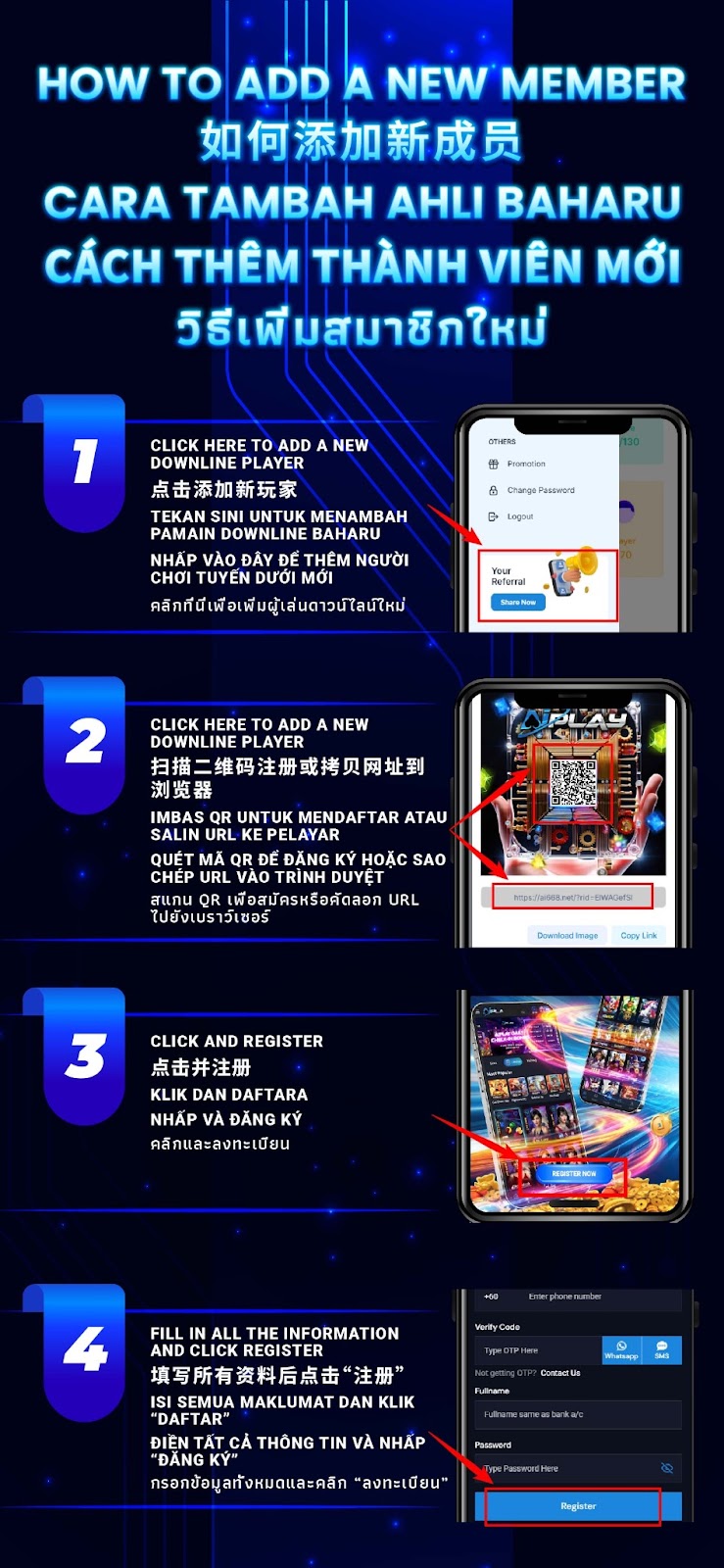
Log in to your AIPLAY App agent account on your mobile device. Tap the Menu button on the App to open the AIPPLAY App side navigation menu. Under the OTHERS section of the menu on your mobile screen, you will find options including Promotion, Change Password, and Logout. Below these options within the App, look for the "Your Referral" section which displays your unique referral QR code and a "Share Now" button on your mobile device. Tap "Share Now" on the AIPLAY App to access and share your personalised referral link and QR code with your prospective new downline member.
Step 2 – Share Your AIPLAY App Referral QR Code or Link with the New Member
After tapping Share Now on the AIPLAY App, your referral screen will display your unique referral QR code along with your personalised referral URL on your mobile device. Share this with your prospective new member using one of two methods through the App — they can scan the QR code directly using their mobile device camera to be taken to the AIPLAY App registration page, or they can copy the referral link from the App and paste it into their mobile browser to access the registration page. Both methods will ensure the new member is correctly linked to your AIPLAY App downline upon successful registration.
Step 3 – New Member Clicks "Register Now" on the AIPLAY App Landing Page
Once your prospective new member has scanned your AIPLAY App referral QR code or opened your referral link in their mobile browser, the AIPLAY App landing page will load on their device. From this page on their mobile screen, the new member should locate and tap the "Register Now" button prominently displayed on the AIPPLAY App registration landing page to proceed to the account registration form.
Step 4 – New Member Fills in All Registration Details and Taps "Register"
On the AIPLAY App registration form on their mobile device, the new member must fill in all required fields to complete their account creation through the mobile interface. The required fields on the App include their phone number with country code, their OTP verification code received via WhatsApp or SMS on their mobile, their Full Name exactly as it appears on their bank account, and their chosen Password. Once all information has been accurately filled in on the AIPPLAY App, the new member taps the "Register" button to complete the registration process and become a confirmed member of your AIPLAY App downline network.
Tips for AIPLAY App Agents to Maximise Downline Growth
Share Your Referral Link Across Multiple Platforms
As an AIPLAY App agent, the more channels you use to share your referral link and QR code from your mobile device, the greater your chances of adding new downline members. Consider sharing your AIPPLAY App referral link via WhatsApp groups, Telegram channels, Facebook groups, Instagram stories, and personal messaging directly from your mobile to reach the widest possible audience of potential new members for your AIPLAY App downline network.
Ensure New Members Register with Accurate Bank Account Details
When guiding new members through the AIPLAY App registration process on their mobile devices, remind them to enter their Full Name exactly as it appears on their bank account in the registration form within the App. This is essential for the AIPLAY App account to be linked correctly to their bank for future deposit and withdrawal transactions through the mobile platform. Incorrect name entries on the App may cause complications with bank verification and should be addressed immediately with AIPLAY customer support.
Track Your Downline Performance Through the AIPLAY App Agent Dashboard
Once your new members have successfully registered and begun playing on the AIPLAY App, you can monitor your downline network's activity, deposits, and referral bonus accumulation through your AIPLAY App agent dashboard on your mobile device. Regularly reviewing your downline performance within the App helps you identify active members, track earnings, and plan your next referral strategy to continue growing your AIPLAY App network and maximising your referral bonus income.
Need Help as an AIPLAY App Agent?
If you encounter any issues while adding new members to your AIPLAY App downline on your mobile device — including a new member who registered but does not appear in your downline list, a referral link that is not working correctly, or any other agent account queries within the App — the AIPLAY customer support team is available 24 hours a day, 7 days a week via Live Chat within the App to assist all agents promptly and professionally.
Start Adding New Members to Your AIPLAY App Downline Today – Grow Your Network and Earn More Referral Bonuses
The AIPLAY App makes it easy for every agent to grow their downline network and maximise referral earnings with a simple 4-step member addition process on their mobile device. Share your unique AIPLAY App referral QR code or link from your mobile, guide your new members through the quick registration form on the App, and watch your downline — and your referral bonus income — grow with every new member who joins and plays on the AIPPLAY App. Log in to your AIPLAY App agent account now on your mobile, access your referral section, and start sharing your referral link today.