





AIPLAY App How to Add a New Agent – Gives Every Agent a Simple 4-Step Process to Create and Activate New Sub-Agent Accounts Directly from the Mobile Dashboard
What Is the AIPLAY App Add New Agent Feature? Empowers Agents to Expand Their Network by Creating Sub-Agent Accounts with Custom IDs, Passwords & Share Bonuses
The AIPLAY App Add New Agent feature allows existing AIPLAY agents to create new sub-agent accounts directly from their agent dashboard on the mobile platform. Each new agent account is set up through the App with a unique Agent ID, a secure password, a descriptive name, and a designated Agent Share bonus tier — giving the new agent their own network and referral capabilities within the AIPLAY App. This feature is ideal for agents who are building and managing a larger team structure on the AIPPLAY App and want to delegate agent responsibilities to trusted partners. Follow the 4-step guide below to add a new agent account on the AIPLAY App quickly and correctly.
How to Add a New Agent on the AIPLAY App – Complete 4-Step Mobile Guide
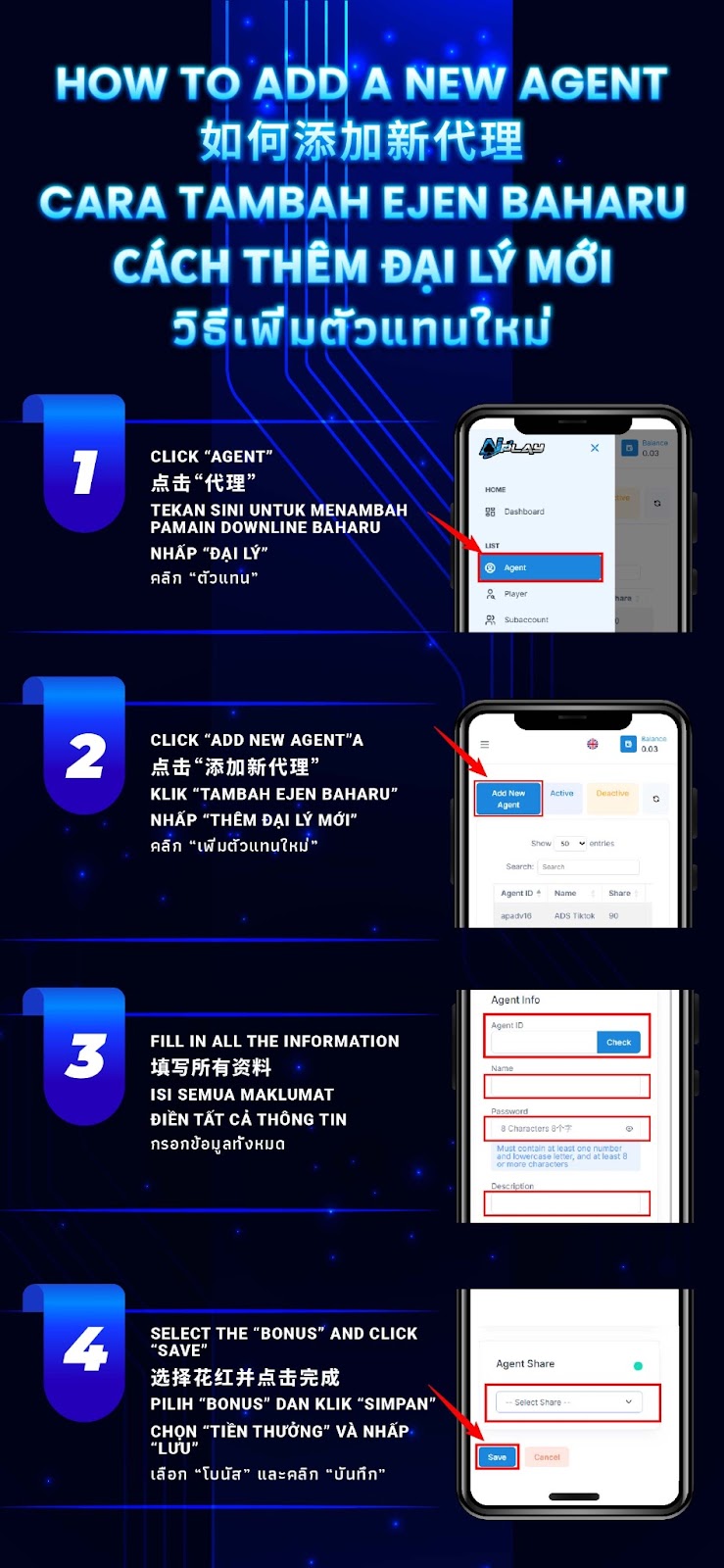
Step 1 – Tap "Agent" from the AIPLAY App Dashboard Navigation
Log in to your AIPLAY App agent account on your mobile device and access the main dashboard. From the side navigation menu within the App, locate the LIST section on your mobile screen and tap on "Agent" to access the full AIPLAY App agent management panel. The Agent section on your mobile device displays your current list of active and deactivated agents, their Agent IDs, Names, and Share percentages — for example, an existing agent listed with their details. This is your central management screen within the AIPPLAY App for all agent-related operations.
Step 2 – Tap "Add New Agent" Button
On the AIPLAY App Agent management screen on your mobile device, locate and tap the "Add New Agent" button displayed in the top area of the agent list panel within the App. Tapping this button on the AIPPLAY App will open the Agent Info form on your mobile screen where you can enter all the required details to create and configure the new agent account.
Step 3 – Fill in All Agent Information
On the Agent Info form within the AIPLAY App, fill in all required fields on your mobile device to set up the new agent account. The fields you need to complete on the App are the Agent ID — enter a unique identifier for the new agent and tap Check to verify availability through the mobile interface — the Name of the agent or their team, the Password which must contain at least one number, one lowercase letter, and be at least 8 characters long, and the Description field which can be used to note the agent's role or source channel. Ensure all fields are filled in accurately on the AIPPLAY App before proceeding to the final step.
Step 4 – Select the Agent Share Bonus and Tap "Save"
After completing the Agent Info fields on the AIPLAY App, scroll down on your mobile screen to the Agent Share section within the mobile interface. From the Select Share dropdown menu on the App, choose the appropriate share bonus tier for the new agent. The Agent Share determines the percentage of rebate or commission the new agent will receive from their downline's activity on the AIPLAY App. Once you have selected the correct share tier on your mobile device, tap the "Save" button on the App to complete the creation and activation of the new AIPLAY App agent account. The new agent will appear in your active agent list within the App immediately after saving.
Important Notes for Adding New Agents on the AIPLAY App
Agent ID Must Be Unique and Available
When creating a new agent account on the AIPLAY App, the Agent ID you enter on your mobile device must be unique and not already in use by another agent on the platform. Always use the Check button next to the Agent ID field within the App to verify that your chosen ID is available before proceeding. Using a duplicate or unavailable Agent ID on the AIPLAY App will prevent the form from being saved and will require you to choose a different identifier for the new agent.
Password Must Meet Security Requirements
The password set for each new AIPLAY App agent account through the mobile interface must meet the platform's minimum security requirements — it must contain at least one number, at least one lowercase letter, and be a minimum of 8 characters in length. Passwords that do not meet these criteria will not be accepted by the AIPLAY App system. Ensure the password is also shared securely with the new agent to prevent unauthorised access to their account on the mobile platform.
Agent Share Determines Downline Commission Structure
The Agent Share bonus tier selected during new agent creation on the AIPLAY App determines the commission and rebate structure that will apply to the new agent's entire downline network through the mobile interface. Selecting the correct share tier on your mobile device is important as it directly affects both the new agent's earnings and the overall commission structure of your AIPLAY App agent network. Review the available share options carefully within the App before confirming and saving the new agent account.
Manage and Monitor Your Agent Network from the App Dashboard
Once a new agent has been successfully added on the AIPLAY App, you can view and manage their account details, activity status, and performance from the Agent management panel in your mobile dashboard. The panel within the App allows you to filter agents by Active or Deactive status on your mobile screen, search by Agent ID or Name, and monitor the share percentages and performance of all agents within your AIPLAY App network at any time directly from your device.
Need Help Adding a New Agent on the AIPLAY App?
If you encounter any issues while adding a new agent on the AIPLAY App — including an Agent ID that cannot be verified, a form submission error on your mobile device, or a query about share bonus tiers within the App — the AIPLAY customer support team is available 24 hours a day, 7 days a week via Live Chat within the App to assist all agents and help resolve any dashboard-related concerns promptly and efficiently.
Expand Your AIPLAY App Agent Network Today – Add New Agents from Your Mobile Dashboard in 4 Simple Steps
The AIPLAY App gives every agent the tools to grow and manage a structured network of sub-agents directly from their mobile dashboard. With a straightforward 4-step process on your device — navigate to Agent, tap Add New Agent, fill in the details on the App, select the share tier, and save — creating a new AIPLAY App agent account takes just minutes. Build your network through the mobile platform, delegate agent responsibilities, and maximise your total AIPPLAY App commission earnings by expanding your team today. Log in to your AIPLAY App agent dashboard now on your mobile and start adding new agents.