





AIPLAY App How to Withdraw – Guides Every Member Through a Fast, Secure, and Straightforward 7-Step Withdrawal Process
How Does Withdrawal Work on the AIPLAY App? Processes All Withdrawal Requests Securely with a Minimum of MYR 50 and a Daily Limit of MYR 30,000
Withdrawing your winnings from the AIPLAY App is a straightforward process that can be completed in 7 steps directly from the AIPLAY App on your mobile device. AIPLAY processes withdrawal requests via bank transfer to your registered bank account, with a minimum withdrawal amount of MYR 50 and a daily withdrawal limit of MYR 30,000 through the mobile platform. First-time withdrawers on the App will need to add a bank account during the process — this is a one-time setup within the AIPLAY App that makes all future withdrawals even faster. Follow the complete guide below to withdraw from the AIPLAY App quickly and without any issues.
AIPLAY App Withdrawal Guide – Step-by-Step Instructions for Withdrawing Your Winnings
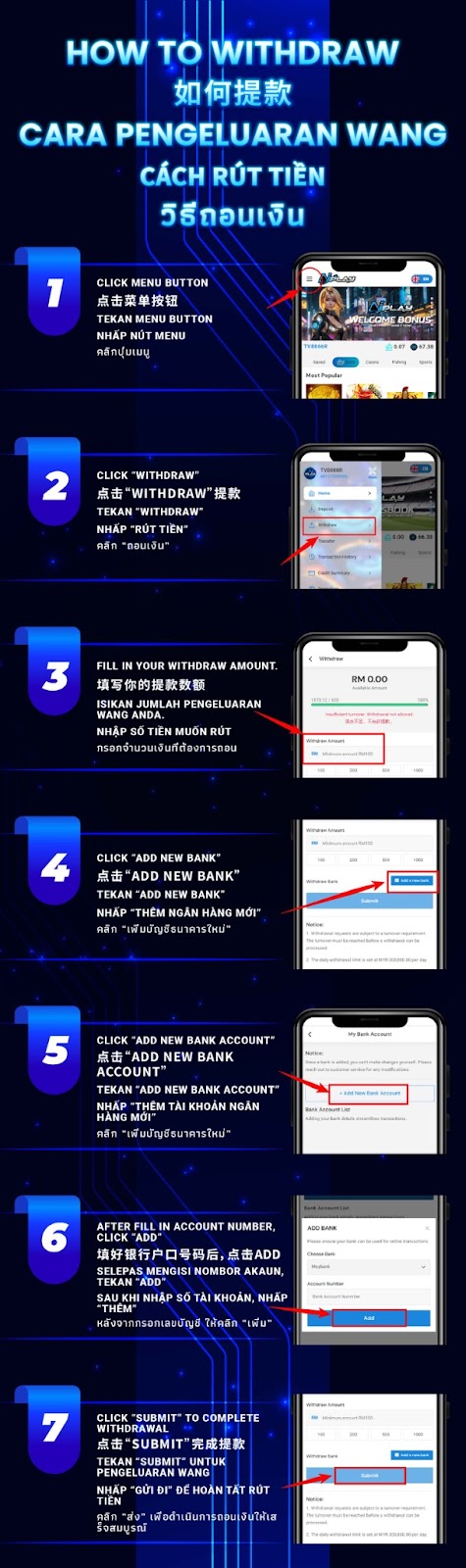
Step 1 – Tap the Menu Button on the AIPLAY App
Log in to your AIPLAY App account on your mobile device. From the main platform screen of the App, locate and tap the Menu button — typically found in the top corner of the AIPLAY App interface. Tapping the Menu button on your mobile device will open the AIPLAY App side navigation menu, which gives you access to all account management functions including Deposit, Withdraw, Transfer, Transaction History, and Credit Summary.
Step 2 – Tap "Withdraw" from the Menu
From the AIPLAY App side navigation menu on your mobile screen, locate and tap the "Withdraw" option. This will take you directly to the AIPLAY App withdrawal screen where you can view your current withdrawable balance, enter your desired withdrawal amount, and manage your registered bank accounts for payout, all within the mobile interface.
Step 3 – Enter Your Withdrawal Amount
On the AIPLAY App Withdraw screen, your current balance will be displayed on your mobile device. In the Withdraw Amount field within the App, enter the amount you wish to withdraw. The minimum withdrawal amount on the AIPLAY App is MYR 50 per transaction. You may also tap one of the preset quick-select amount buttons available on your mobile screen for faster entry through the App. Ensure your withdrawal amount meets the minimum requirement and does not exceed the daily withdrawal limit of MYR 30,000 before proceeding.
Step 4 – Tap "Add New Bank" to Register Your Bank Account
If you are withdrawing for the first time on the AIPLAY App, you will need to add a bank account to receive your funds. On the withdrawal screen of the App, tap the "Add New Bank" button next to the Withdraw Bank field on your mobile device. This will take you to the My Bank Account screen within the AIPLAY App where you can manage all your registered bank accounts for withdrawals.
Step 5 – Tap "Add New Bank Account" on the My Bank Account Screen
On the My Bank Account screen of the AIPLAY App, tap the "+ Add New Bank Account" button on your mobile device to begin adding your bank details. A notice will be displayed within the App reminding you that once a bank is added it cannot be changed — please confirm with customer service if you need any modifications. Your bank account will be linked securely to your AIPLAY App account and used for all future withdrawal payouts through the mobile platform.
Step 6 – Select Your Bank, Enter Your Account Number & Tap "Add"
On the Bank Account List screen of the AIPLAY App, select your preferred bank from the Choose Bank dropdown menu on your mobile device — for example Maybank or any other supported Malaysian bank. Then enter your bank account number accurately in the Account Number field within the App. Once you have confirmed on your mobile screen that both the bank name and account number are correct, tap the "Add" button on the AIPLAY App to save and register your bank account to your profile.
Step 7 – Tap "Submit" to Complete Your Withdrawal Request
After your bank account has been added and selected as the withdrawal destination within the AIPLAY App, return to the withdrawal amount screen on your mobile device, confirm your desired withdrawal amount, and tap the "Submit" button on the App to complete and submit your withdrawal request. AIPLAY will process your withdrawal and transfer the funds to your registered bank account. Withdrawal requests through the App are subject to a turnover requirement before processing — ensure your account meets the minimum turnover before submitting.
Important Notes for AIPLAY App Withdrawals
Minimum Withdrawal Amount
The minimum withdrawal amount on the AIPLAY App is MYR 50 per transaction through the mobile platform. Withdrawal requests below MYR 50 will not be processed via the App. Always ensure your withdrawal amount meets or exceeds the MYR 50 minimum before submitting your request on the AIPLAY App to avoid any failed or rejected withdrawals.
Daily Withdrawal Limit
The daily withdrawal limit on the AIPLAY App is set at MYR 30,000 per day through the mobile platform. Members cannot submit withdrawal requests on the App that would cause their total daily withdrawal amount to exceed this limit. If you need to withdraw an amount larger than MYR 30,000, you will need to submit the remaining amount on the following day through the App.
Turnover Requirement Must Be Met Before Withdrawal
The AIPLAY App requires members to meet a minimum turnover requirement before a withdrawal request can be processed through the mobile platform. The effective betting amount must equal the amount deposited before a withdrawal will be approved. Members who have not yet fulfilled the turnover requirement on the App will not be able to proceed with their withdrawal until the required turnover has been reached through gameplay on the AIPLAY App.
Bank Account Cannot Be Changed After Adding
Once a bank account has been added and registered to your AIPLAY App profile through the mobile interface, it cannot be changed independently. If you need to modify or update your registered bank account details for AIPLAY App withdrawals, please contact the AIPLAY customer support team via Live Chat within the App for assistance. Always double-check your bank name and account number on your mobile screen before tapping Add on the App to avoid any errors in your withdrawal bank details.
Need Help with Your Withdrawal on the AIPLAY App?
If you experience any issues with your AIPLAY App withdrawal — including a request that was submitted but not received, a question about your withdrawal limit, or any account-related query on your mobile device — the AIPLAY customer support team is available 24 hours a day, 7 days a week via Live Chat within the App. Have your withdrawal amount and transaction details ready on your mobile when contacting support through the App for the fastest and most efficient assistance.
Ready to Withdraw Your Winnings? Follow the AIPLAY App Withdrawal Guide and Get Your Funds Fast
The AIPLAY App ensures that every member can access their winnings quickly and securely through a straightforward 7-step withdrawal process on their mobile device. With a minimum withdrawal of MYR 50, a daily limit of MYR 30,000, and a simple bank account registration process within the App, cashing out on the AIPLAY App has never been easier. Follow the step-by-step guide above on your mobile, add your bank account through the App, submit your withdrawal request, and receive your funds directly to your bank. Log in to the AIPLAY App now and start your withdrawal today.