





AIPLAY App USDT TRC-20 Deposit Guide – Accepts Secure Cryptocurrency Deposits So You Can Fund Your Account with USDT in Just 5 Steps
How to Deposit on AIPLAY Using USDT TRC-20 – Step-by-Step Guide
The AIPLAY App supports USDT TRC-20 as a cryptocurrency deposit method, giving members a fast, borderless, and secure way to fund their AIPLAY account using Tether (USDT) on the TRON blockchain network directly from their mobile device. USDT deposits on the AIPLAY App are processed via a QR code scanning mechanism that connects directly to the TRC-20 payment system, ensuring your funds are transferred securely and credited to your account promptly through the mobile interface. The minimum deposit amount for USDT on the AIPLAY App is MYR 45. Follow the 5-step guide below to complete your USDT TRC-20 deposit quickly and correctly on your mobile device.
How to Deposit with USDT TRC-20 on the AIPLAY App – Complete 5-Step Mobile Guide
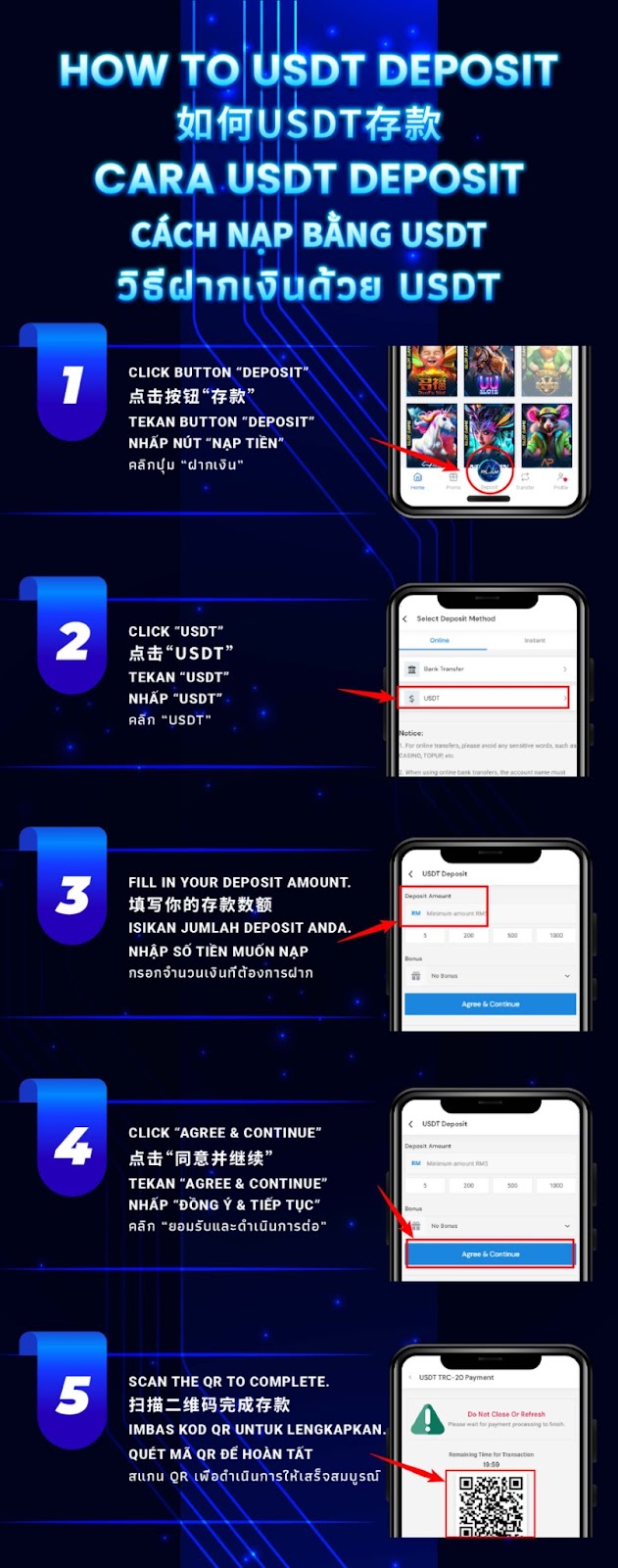
Step 1 – Tap the "Deposit" Button on the AIPLAY App
Log in to your AIPLAY App account on your mobile device and go to the main platform screen. Locate the "Deposit" button in the navigation bar at the bottom of the AIPPLAY App screen and tap it to access the deposit method selection page on your mobile device. From here you will be able to view and select all available deposit options including the USDT cryptocurrency deposit method through the App.
Step 2 – Select "USDT" from the Deposit Method List
On the Select Deposit Method screen within the AIPLAY App, navigate to the Online tab and locate the USDT option in the list on your mobile screen. Tap "USDT" to select it as your preferred deposit method. You will also see other available options such as Bank Transfer on this screen of the App — ensure you select specifically USDT to proceed with the TRC-20 cryptocurrency deposit process on the AIPLAY App.
Step 3 – Enter Your USDT Deposit Amount
After selecting USDT on the AIPPLAY App, the USDT Deposit form will appear on your mobile screen. In the Deposit Amount field, enter the amount you wish to deposit into your AIPLAY App account. The minimum deposit amount for USDT on the AIPLAY App is MYR 45. You may also use the preset quick-select amount buttons displayed on your mobile screen — such as 5, 200, 500, or 1000 — for faster entry through the App. Select or enter your desired amount before proceeding to the next step on your device.
Step 4 – Tap "Agree & Continue" to Proceed
Once your deposit amount has been entered on the AIPLAY App, review the details on your mobile screen including your selected deposit amount and any applicable bonus displayed in the Bonus section. When you are ready to proceed, tap the "Agree & Continue" button on the App to confirm your deposit request and move to the final payment step. Tapping this button on the AIPPLAY App signifies your agreement with the deposit terms for this transaction.
Step 5 – Scan the QR Code to Complete Your USDT TRC-20 Payment
After tapping Agree & Continue on the AIPLAY App, the USDT TRC-20 Payment screen will appear on your mobile device displaying a QR code along with a countdown timer showing the remaining time available to complete your transaction. Open your USDT wallet app on your mobile device, scan the QR code displayed on the AIPLAY App payment screen, and confirm the payment from your wallet to complete your deposit. Important — do not close or refresh the payment page on your mobile browser while the transaction is in progress, as doing so may interrupt the payment process through the App. Once payment is confirmed, your AIPLAY App account will be credited with your deposit amount instantly on your mobile device.
Important Notes for USDT TRC-20 Deposits on the AIPLAY App
Minimum Deposit Amount
The minimum deposit amount when using USDT TRC-20 on the AIPLAY App is MYR 45 per transaction through the mobile platform. Deposit requests below this minimum threshold will not be processed via the App. Ensure your deposit amount meets or exceeds the MYR 45 minimum before tapping Agree & Continue on your mobile device to avoid any failed or rejected transactions.
Do Not Close or Refresh the Payment Page
While completing your USDT TRC-20 payment on the AIPLAY App, it is critical that you do not close, minimise, or refresh the payment screen on your mobile device at any point during the transaction. The payment page on the App displays a countdown timer indicating how long you have to complete the QR scan and confirm the payment. Closing or refreshing the page on your mobile before the transaction is confirmed may result in a failed deposit that requires manual review by the AIPLAY support team.
Use the TRC-20 Network Only
When completing your USDT deposit on the AIPLAY App, ensure that your USDT wallet is set to send funds using the TRC-20 network specifically. Sending USDT via a different blockchain network — such as ERC-20 or BEP-20 — to an AIPPLAY App TRC-20 deposit address may result in permanent loss of funds. Always verify your wallet network settings on your mobile device before scanning the QR code and confirming the payment through the App.
Need Assistance with Your USDT Deposit on the AIPLAY App?
If you encounter any issues during your USDT TRC-20 deposit on the AIPLAY App — including a payment that was sent but not credited, a QR code that expired before completion, or any other transaction queries on your mobile device — the AIPLAY customer support team is available 24 hours a day, 7 days a week via Live Chat within the App to assist you. Always keep a record of your transaction hash when making USDT deposits through the App for reference in the event of any disputes.
Deposit USDT on the AIPLAY App Today – Fast, Secure & Crypto-Friendly Funding for Your Mobile Account
The AIPLAY App welcomes cryptocurrency users with a seamless and secure USDT TRC-20 deposit option that lets you fund your AIPLAY account quickly without traditional banking limitations, all from your mobile device. With a minimum deposit of just MYR 45 and a simple 5-step process ending with a QR code scan, depositing USDT on the AIPLAY App is straightforward and efficient. Follow the guide above on your mobile, complete your USDT deposit through the App, and get back to enjoying everything AIPLAY has to offer on your device — from live casino and slots to sports betting and exclusive daily promotions.