





AIPLAY App How to Claim Downline Rebate – Lets Every Member Earn and Claim Referral Rebates with This Simple 3-Step Mobile Guide
What Is the AIPLAY App Downline Rebate? Rewards Members for Building an Active Referral Network by Paying Out Generous Commission and Rebate Bonuses Automatically
The AIPLAY App Downline Rebate is a referral reward system accessible through the mobile platform that allows AIPLAY App members to earn real cash rebates based on the activity of the players they have referred — their downline. Every time a referred member actively plays on the AIPLAY App, the referring member accumulates commission and rebate rewards that can be claimed directly through the AIPLAY App on their mobile device. Follow the 3-step guide below to check and claim your AIPLAY App downline rebate quickly and easily.
How to Claim Your Downline Rebate on the AIPLAY App – Complete 3-Step Mobile Guide
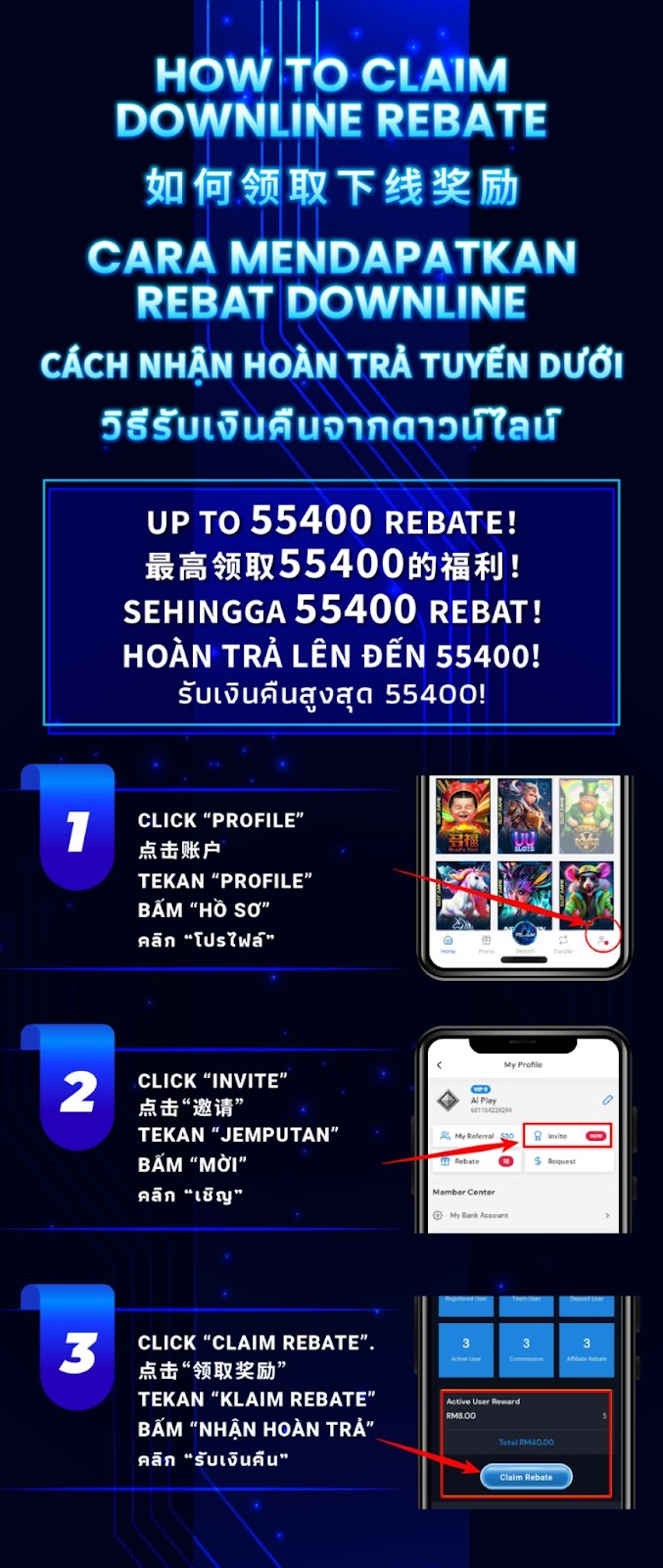
Step 1 – Tap "Profile" on the AIPLAY App Main Screen
Log in to your AIPLAY App account on your mobile device. From the main platform screen of the App, locate and tap the "Profile" icon in the bottom navigation bar on your mobile screen — typically represented by an account or person icon at the rightmost position of the navigation menu. Tapping Profile on the AIPLAY App will take you to the My Profile screen where you can access your referral details, rebate summary, and other account management options.
Step 2 – Tap "Invite" on Your AIPLAY App Profile Page
On the My Profile screen of the AIPLAY App, you will see several quick-access tabs on your mobile device below your profile name and member ID — including My Referral, Invite, Rebate, and Request. Locate and tap the "Invite" tab within the App to access your AIPLAY referral and downline rebate dashboard. The Invite section on your mobile screen displays a full overview of your referral network activity, including your Registered User count, Team User count, Deposit User count, Active Users, Commissions earned, and Affiliate Rebates accumulated from your AIPLAY App downline.
Step 3 – View Your Active User Reward and Tap "Claim Rebate"
On the AIPLAY App Invite dashboard, scroll down on your mobile device to find the Active User Reward section within the App. This section displays the total rebate amount currently available for you to claim from your active downline members. For example, if you have 3 Active Users each generating rebate amounts, your total claimable Active User Reward will be shown as the combined total on your mobile screen. Once you have reviewed your claimable rebate amount on the AIPLAY App, tap the "Claim Rebate" button to collect your downline rebate instantly and have it credited to your account balance.
Understanding Your AIPLAY App Downline Rebate Dashboard
Registered User, Team User & Deposit User Counts
The AIPLAY App Invite dashboard provides a clear breakdown of your referral network across three key metrics on your mobile device — Registered Users (total members who signed up using your referral link), Team Users (the total number of players in your extended downline network), and Deposit Users (members who have made at least one qualifying deposit and are therefore eligible to generate rebates for you on the AIPLAY App). Monitoring these three figures within the App helps you understand the size and activity level of your current AIPPLAY referral network.
Active Users, Commission & Affiliate Rebate
Below the three user count metrics on the AIPLAY App, the Invite dashboard also displays on your mobile screen your Active Users (downline members who are currently active and generating rebate rewards for you), your total Commissions earned, and your accumulated Affiliate Rebates. These figures within the App update regularly based on your downline's activity on the AIPPLAY App and represent the total earnings available across all three rebate and commission channels.
Active User Reward – Your Primary Claimable Rebate
The Active User Reward section on the AIPLAY App Invite dashboard shows the specific rebate amount currently generated by each of your active downline members, along with the total combined amount available for claim on your mobile device. The total Active User Reward is calculated based on the number of active downline members and their individual reward contributions within the App. Tap the Claim Rebate button on the AIPLAY App whenever you have accumulated a claimable reward to transfer it directly into your account balance.
Need Help Claiming Your Downline Rebate on the AIPLAY App?
If you encounter any issues when claiming your AIPLAY App downline rebate on your mobile device — such as a reward amount that is not showing correctly, a Claim Rebate button that is not responding within the App, or a query about how your rebate amount is calculated — the AIPLAY customer support team is available 24 hours a day, 7 days a week via Live Chat within the App to assist you and resolve any rebate-related questions promptly.
Claim Your AIPLAY App Downline Rebate Today – Build Your Referral Network and Earn Rewards on Mobile
The AIPLAY App rewards every member who grows and maintains an active referral network through a generous downline rebate system accessible on their mobile device. All it takes is 3 simple steps on the App — tap Profile, go to Invite, and claim your Active User Reward. The more active your downline network on the AIPPLAY App, the more you earn every single time they play. Log in to your AIPLAY App account now on your mobile, check your current downline rebate balance within the App, and claim your rewards today.