





AIPLAY App How to Transfer Credit – Lets Every Member Check Their Full Game Credit Balance and Transfer All Outstanding Credits Back to the Main Wallet in Just 4 Steps
What Is the AIPLAY App Credit Transfer Feature? Provides a Convenient Credit Summary Tool That Lets You View and Consolidate All Game Credits into Your Main Wallet Instantly
The AIPLAY App Credit Transfer feature allows members to view their total credit balance across all connected game providers through the mobile interface — including 918KISS, PLAYTECH, GW99, MAXBET, VPOWER, and many more — and transfer all outstanding game credits back to their AIPLAY App main wallet in a single tap. This is particularly useful when switching between game providers on the App or before making a withdrawal, as credits held in individual game wallets must first be transferred back to the main AIPLAY App wallet before they can be used elsewhere or withdrawn through the mobile platform. The entire process takes just 4 steps and can be completed in seconds from the AIPLAY App.
How to Transfer Credit on the AIPLAY App – Complete 4-Step Mobile Guide
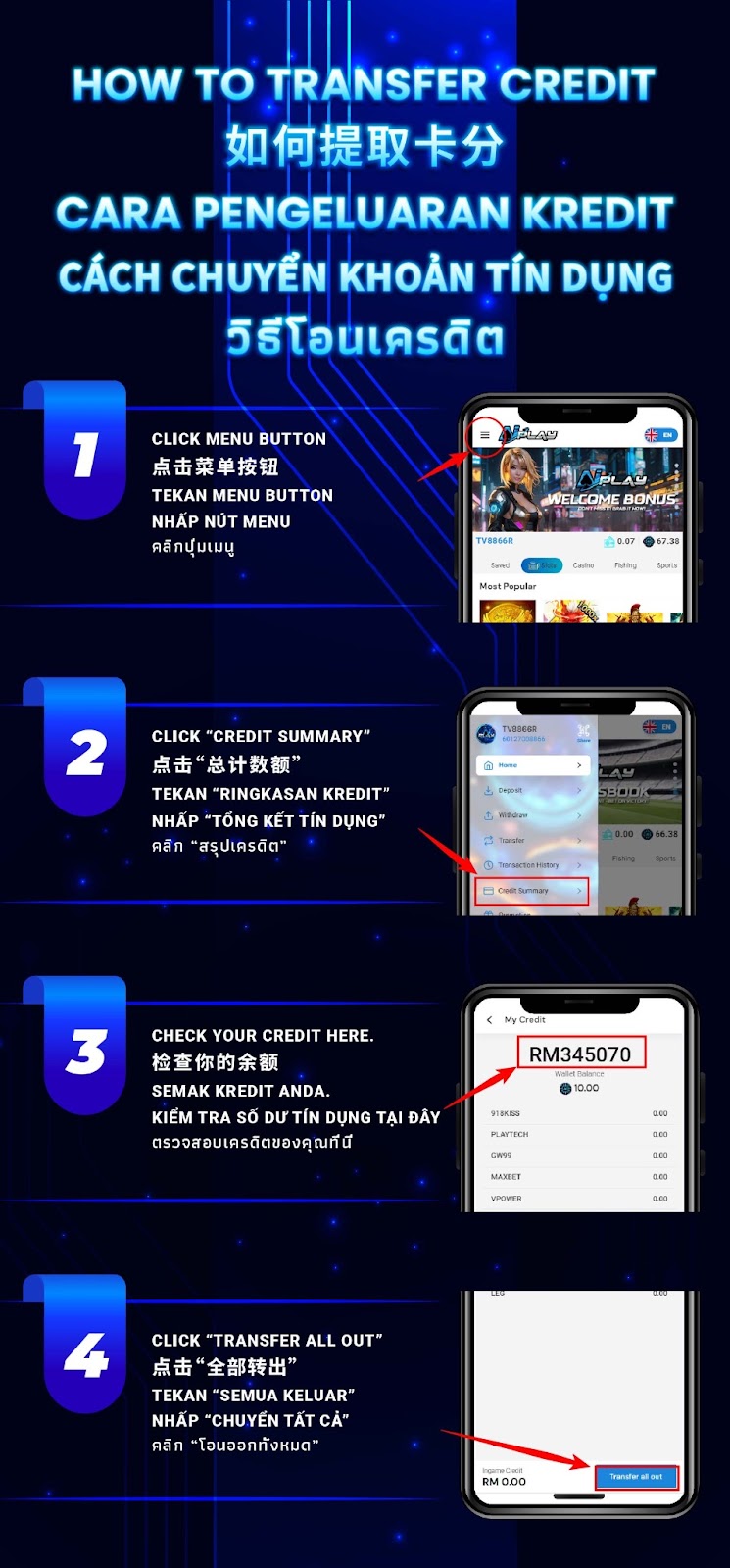
Step 1 – Tap the Menu Button on the AIPLAY App
Log in to your AIPLAY App account on your mobile device. From the main platform screen of the App, locate and tap the Menu button in the top corner of the interface on your mobile screen. Tapping this button on the AIPLAY App will open the side navigation menu, which provides access to all account management functions including Home, Deposit, Withdraw, Transfer, Transaction History, Credit Summary, and Promotion.
Step 2 – Tap "Credit Summary" from the Navigation Menu
From the AIPLAY App side navigation menu on your mobile device, locate and tap the "Credit Summary" option. This will take you to the My Credit screen within the AIPPLAY App where you can view a complete summary of your account balance and the credit amounts currently held in each connected game provider wallet. The Credit Summary screen on the App is your central hub for managing all game credits across the entire AIPLAY mobile platform.
Step 3 – Review Your Credit Balance Across All Game Providers
On the My Credit screen of the AIPLAY App, your total wallet balance is displayed prominently at the top on your mobile device — for example RM345,070. Below the main wallet balance on the App, you will see a detailed breakdown of credits currently sitting in individual game provider wallets, including 918KISS, PLAYTECH, GW99, MAXBET, VPOWER, LEG, and all other connected providers. Each provider wallet on the AIPPLAY App displays its current credit balance, allowing you to see exactly how your total credits are distributed across all active game wallets on the mobile platform.
Step 4 – Tap "Transfer All Out" to Move All Credits to Your Main Wallet
Once you have reviewed your credit summary on the AIPLAY App, scroll to the bottom of the My Credit screen on your mobile device to find the "Transfer All Out" button. Tap this button within the AIPPLAY App to initiate an automatic transfer of all outstanding credits from every connected game provider wallet back to your main wallet in a single action. The transfer is processed instantly through the mobile interface and your AIPLAY App main wallet balance will be updated immediately on your mobile screen to reflect the full consolidated credit amount after the Transfer All Out is completed.
Why You Should Use the AIPLAY App Credit Transfer Feature
Consolidate Credits Before Making a Withdrawal
Before submitting a withdrawal request on the AIPLAY App, it is important to ensure that all your credits have been consolidated back into your main wallet through the mobile interface. Credits that remain in individual game provider wallets within the App cannot be included in a withdrawal until they have been transferred back to the main wallet. Using the Transfer All Out feature on the AIPLAY App ensures that your full available balance is ready for withdrawal without any credits being left behind in game wallets on your mobile device.
Switch Between Games Without Losing Credits
When playing multiple games across different providers on the AIPLAY App, credits can accumulate in separate game-specific wallets through the mobile platform. Using the AIPLAY App Credit Summary and Transfer All Out feature allows you to quickly retrieve all credits from game wallets and consolidate them back into your main wallet on your mobile device, making it easy to fund a different game or provider without needing to manually transfer credits one at a time through the App.
Full Visibility Across All Game Provider Wallets
The AIPLAY App Credit Summary screen gives members complete visibility into their credit distribution across every connected game provider on the mobile platform. Whether you have credits in 918KISS, PLAYTECH, GW99, MAXBET, VPOWER, or any other provider, the Credit Summary screen on the AIPLAY App shows you the exact balance in each wallet on your mobile device — giving you full transparency and control over your total AIPLAY App account credits at all times.
Need Help with Your Credit Transfer on the AIPLAY App?
If you experience any issues with the AIPLAY App Credit Transfer feature on your mobile device — such as credits that are not transferring correctly, a Transfer All Out that did not complete successfully within the App, or a discrepancy between your displayed balance and your expected credit amount — the AIPLAY customer support team is available 24 hours a day, 7 days a week via Live Chat within the App to assist you promptly and resolve any credit-related queries.
Manage Your AIPLAY App Credits Easily – Check Your Balance and Transfer All Credits to Your Main Wallet Now
The AIPLAY App gives every member full control over their credits on their mobile device with the convenient Credit Summary and Transfer All Out feature. Whether you are preparing to withdraw, switching game providers, or simply checking your balance across all wallets, the AIPLAY App credit transfer process takes just 4 steps and a single tap to consolidate everything back to your main wallet instantly through the mobile interface. Log in to the AIPLAY App now, open the Credit Summary on your device, and transfer all your game credits back to your main wallet in seconds.