





AIPLAY App How to Bank Transfer – Guides Every Member Through a Secure and Straightforward Bank Transfer Deposit Process
What Is the AIPLAY App Bank Transfer Deposit Method? Accepts Direct Bank Transfers from All Major Malaysian Banks for Fast and Reliable Account Funding
The AIPLAY App Bank Transfer deposit method allows members to fund their accounts by making a direct online banking transfer from their Malaysian bank account to AIPLAY, all initiated from their mobile device. This is one of the most widely used and reliable deposit methods available on the AIPLAY App, supporting all major Malaysian banks through the mobile interface. Unlike instant payment gateways, bank transfers on the AIPLAY App require members to fill in their bank details and transfer the specified amount directly — making it a trusted option for members who prefer traditional online banking for their deposits via the App. Follow the step-by-step guide below to complete your AIPLAY App bank transfer deposit correctly and without any issues.
How to Deposit via Bank Transfer on the AIPLAY App – Step-by-Step Mobile Guide
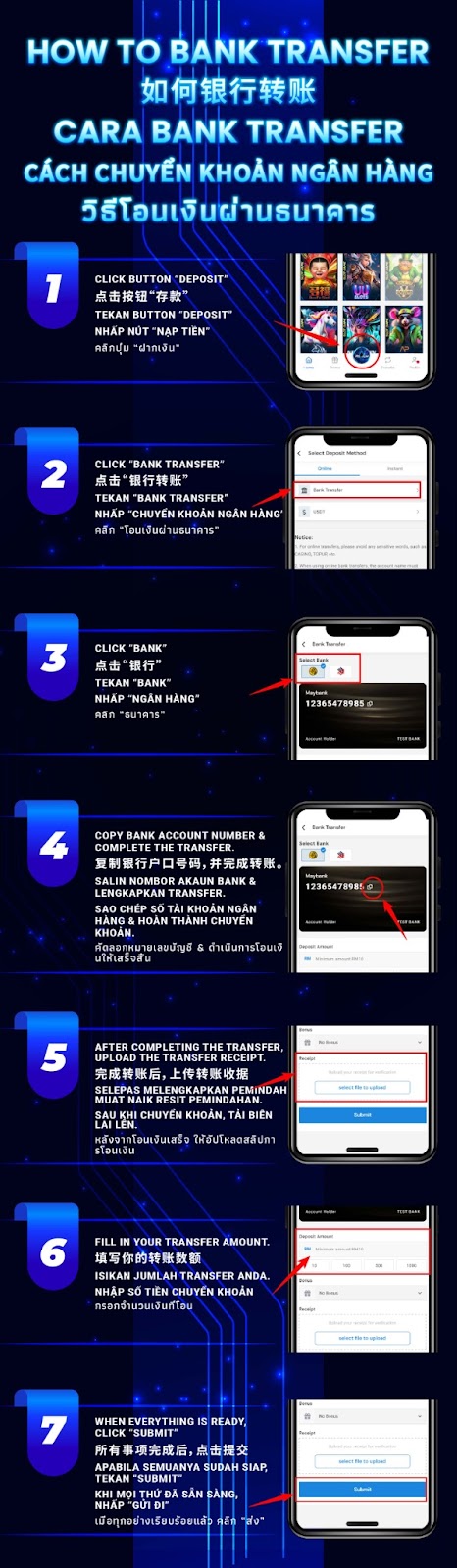
Step 1 – Tap the "Deposit" Button on the AIPLAY App
Log in to your AIPLAY App account on your mobile device. From the main platform screen of the App, tap the "Deposit" button located in the bottom navigation bar on your mobile screen. This will take you to the deposit method selection screen within the AIPLAY App where you can view all available deposit options including instant payment methods and the direct Bank Transfer option.
Step 2 – Select "Bank Transfer" from the Deposit Method List
On the Select Deposit Method screen of the AIPLAY App, navigate to the Bank tab on your mobile device to view all available bank-based deposit options. Locate and tap "Bank Transfer" on your mobile screen to select it as your deposit method. This will take you to the Bank Transfer deposit form within the AIPLAY App where you will be required to enter your deposit amount and provide the necessary bank account information to complete the transfer.
Step 3 – Enter Your Deposit Amount and Bank Details
On the Bank Transfer deposit form of the AIPLAY App, fill in all required fields accurately on your mobile device. Enter your desired Deposit Amount in MYR on the App — ensuring it meets the minimum deposit requirement. Then provide your bank details as required by the form within the AIPLAY App, including selecting your bank from the available options on your mobile screen. Review the on-screen notices carefully on the App — for online transfers, please avoid any sensitive words in the transfer reference such as casino, 1XBET, TOPUP, and similar terms, as these may cause your transfer to be flagged or rejected by your bank. When using online banking through the AIPLAY App, the account name must also match your registered name on the platform.
Step 4 – Tap "Submit" to Complete Your Bank Transfer Deposit Request
Once all required details have been accurately filled in on the AIPLAY App — including your deposit amount and bank information on your mobile device — tap the "Submit" button on the App to confirm and submit your bank transfer deposit request. After submitting through the AIPLAY App, follow any additional on-screen instructions on your mobile to complete the actual bank transfer through your online banking portal. Once your transfer is confirmed and received by AIPLAY, your account balance within the App will be updated accordingly.
Important Notes for AIPLAY App Bank Transfer Deposits
Avoid Sensitive Words in Transfer References
When making a bank transfer deposit through the AIPLAY App, it is important to avoid using sensitive or flagged words in your transfer reference or description field on your mobile device. Words such as casino, gambling-related terms, third-party payment processor names like 1XBET, or terms such as TOPUP may cause your bank to flag or reject the transfer. Keep your transfer reference neutral and straightforward when depositing via the AIPLAY App to ensure your bank transfer deposit is processed without issues.
Account Name Must Match Your Registered Name
For bank transfer deposits on the AIPLAY App, the name on your bank account must match the full name registered on your AIPLAY App profile. Transfers made from a bank account that does not match your AIPLAY App registered name may be subject to additional verification or rejection. Ensure that your registered name on the AIPPLAY App is consistent with the name on your bank account before proceeding with a bank transfer deposit through the mobile platform.
Bank Transfer Processing Time
Unlike instant deposit methods, bank transfer deposits on the AIPLAY App may require a short processing period after the transfer is completed before the funds are reflected in your AIPLAY App account balance. If your deposit has not been credited within the expected timeframe after a successful bank transfer initiated through the App, please contact the AIPLAY customer support team via Live Chat within the AIPLAY App with your transfer receipt for prompt assistance.
Need Help with Your Bank Transfer Deposit on the AIPLAY App?
If you experience any issues with your AIPLAY App bank transfer deposit — including a transfer that was completed but not credited to your account, a query about accepted banks, or any other deposit-related concern on your mobile device — the AIPLAY customer support team is available 24 hours a day, 7 days a week via Live Chat within the App. Always keep a copy of your bank transfer receipt or transaction confirmation on your mobile as proof of payment when contacting AIPPLAY support through the App.
Fund Your AIPLAY App Account via Bank Transfer Today – Secure, Reliable & Widely Supported on Mobile
The AIPLAY App gives every member the flexibility to deposit using a direct bank transfer from their preferred Malaysian bank directly through their mobile device — no third-party e-wallet required. Simply log in to the AIPLAY App, navigate to the Deposit section on your mobile, select Bank Transfer, fill in your details accurately within the App, and submit to fund your account reliably. Bank transfer is one of the most trusted and widely used deposit methods on the AIPLAY App, making it the ideal choice for members who prefer depositing directly from their online banking account on their mobile. Follow the guide above on the App and complete your bank transfer deposit on the AIPLAY App today.