





AIPLAY App FPay QR Payment Guide – Makes It Easy to Deposit Instantly Using FPay QR Payment with This Clear 6-Step Mobile Tutorial
What Is FPay QR Payment on the AIPLAY App? Offers a Fast and Convenient Instant QR Deposit Method That Lets You Fund Your Account in Seconds
FPay QR Payment is an instant deposit method available on the AIPLAY App that allows members to fund their accounts quickly by scanning a QR code generated through the FPay DuitNow payment system directly from their mobile device. Deposits made via FPay QR Payment on the AIPLAY App are processed instantly, with a minimum deposit of MYR 30 and a maximum of MYR 10,000 per transaction through the mobile interface. The process is simple, secure, and can be completed in just 6 steps on your mobile device. Follow the guide below to make your first FPay QR Payment deposit on the AIPLAY App without any difficulty.
How to Deposit on the AIPLAY App Using FPay QR Payment – Full 6-Step Mobile Guide
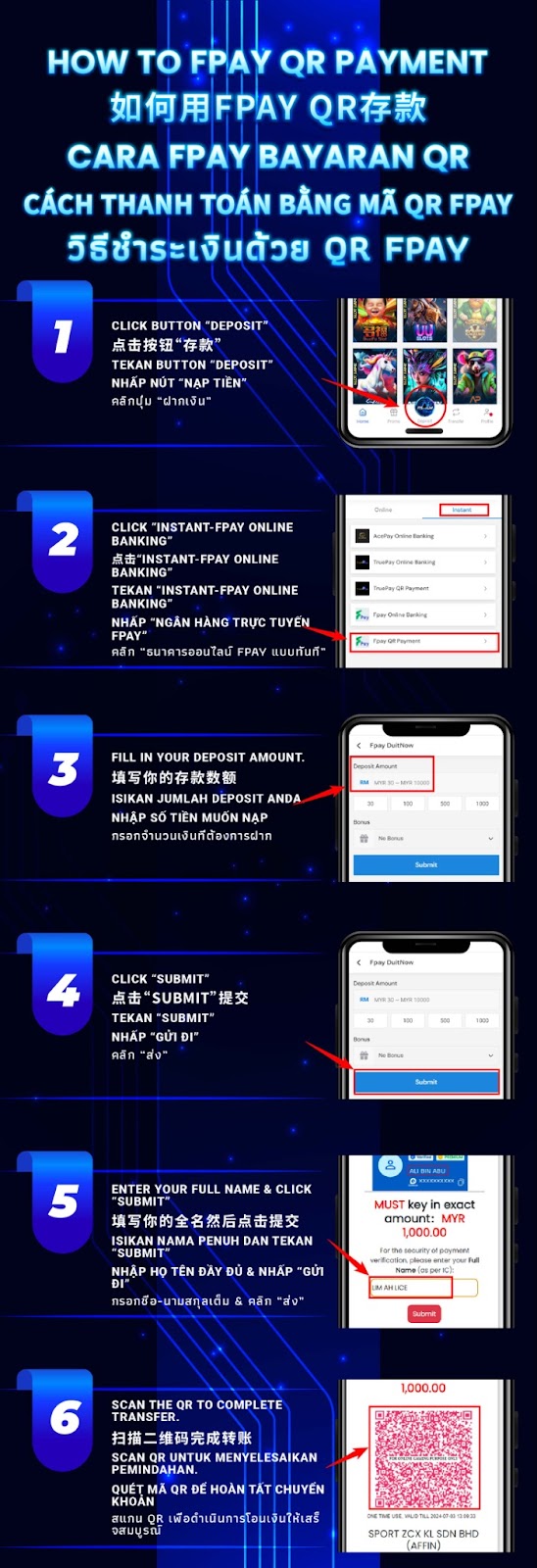
Step 1 – Tap the "Deposit" Button on the AIPLAY App
Log in to your AIPLAY App account on your mobile device. From the main screen of the App, locate and tap the "Deposit" button found in the navigation bar at the bottom of the AIPLAY App interface. Tapping this button on your mobile device will take you to the deposit method selection screen within the App where all available instant and bank deposit options are displayed.
Step 2 – Select "Fpay QR Payment" from the Instant Deposit Tab
On the Select Deposit Method screen of the AIPLAY App, ensure you are on the Instant tab on your mobile device. From the list of available instant deposit methods within the App — which includes options such as AcePay Online Banking, TruePay Online Banking, TruePay QR Payment, and Fpay Online Banking — locate and tap "Fpay QR Payment" on your mobile screen to select it as your deposit method for this transaction on the AIPLAY App.
Step 3 – Enter Your Desired Deposit Amount
After selecting Fpay QR Payment on the AIPLAY App, the Fpay DuitNow deposit form will appear on your mobile device. In the Deposit Amount field on the App, enter the amount you wish to deposit into your AIPLAY account through the mobile platform. The minimum deposit via FPay QR Payment on the AIPLAY App is MYR 30 and the maximum is MYR 10,000. You may also use the quick-select preset buttons on your mobile screen — such as 30, 100, 500, or 1000 — for faster entry through the App. Confirm your amount before proceeding on your device.
Step 4 – Tap the "Submit" Button
Once your deposit amount has been entered on the AIPLAY App and you have reviewed the details on your mobile screen, tap the "Submit" button to proceed with your FPay QR Payment deposit on the App. Tapping Submit on your mobile device confirms your deposit request and advances you to the identity verification step required to complete the FPay DuitNow payment securely through the AIPLAY App.
Step 5 – Enter Your Full Name and Tap "Submit" to Verify
After tapping Submit on the AIPLAY App, a payment verification screen will appear on your mobile device displaying the exact deposit amount you must transfer — for example, MYR 1,000.00. This screen within the App will also display a Full Name field where you are required to enter your full name exactly as it appears on your IC or identification document. Enter your full name accurately on your mobile device and tap the "Submit" button on the App to confirm your identity and proceed to the QR code payment step. Entering an incorrect name on the AIPLAY App may result in a failed payment verification.
Step 6 – Scan the QR Code to Complete Your FPay QR Payment
After submitting your full name on the AIPLAY App, a QR code will be generated and displayed on your mobile screen showing the exact transfer amount — for example, MYR 1,000.00. This is a one-time use QR code valid for a limited time only within the App. Open your mobile banking app or preferred e-wallet on your device that supports DuitNow QR payments, scan the QR code displayed on the AIPLAY App, and confirm the payment. Once your bank or e-wallet confirms the transfer, your AIPLAY App account will be credited with the deposited amount instantly on your mobile device.
Important Notes for FPay QR Payment Deposits on the AIPLAY App
Transfer the Exact Amount Shown on Screen
When completing your FPay QR Payment on the AIPLAY App, it is essential that you transfer the exact amount displayed on the payment screen of your mobile device. The AIPLAY App FPay QR payment system verifies the transferred amount against the requested amount — transferring a different amount may result in a failed or delayed deposit that requires manual review and intervention by the AIPLAY support team.
Full Name Must Match Your IC
The full name you enter during the Step 5 verification on the AIPLAY App must exactly match the name on your identification document as registered with your bank. Entering a nickname, abbreviated name, or incorrect name on the mobile App may cause the payment verification to fail. Accuracy in this step within the AIPPLAY App is essential to ensure your FPay QR Payment is processed successfully without delays.
QR Code Is One-Time Use and Time-Limited
The QR code generated during the AIPLAY App FPay QR Payment process is valid for a single use only and expires after a limited time on your mobile screen. If you do not scan and complete the payment within the available time window on the App, the QR code will expire and you will need to restart the deposit process from the beginning within the AIPPLAY App. Ensure your banking app on your mobile device is ready before proceeding to the QR code step to avoid expiry.
Minimum & Maximum Deposit Limits
The minimum deposit amount via FPay QR Payment on the AIPLAY App is MYR 30 per transaction through the mobile platform, and the maximum is MYR 10,000 per transaction. Deposits outside this range will not be processed via the App. Always verify that your intended deposit amount falls within these limits before submitting your FPay QR Payment request on the AIPLAY App.
Need Help with Your FPay QR Payment on the AIPLAY App?
If you experience any issues with your FPay QR Payment deposit on the AIPLAY App — including a QR code that expired, a payment sent but not credited, or any verification difficulties on your mobile device — the AIPLAY customer support team is available 24 hours a day, 7 days a week via Live Chat within the App. Keep a record of your transaction reference number and the amount transferred when contacting support through the App for the fastest resolution.
Deposit on the AIPLAY App Using FPay QR Payment Now – Fast, Instant & Hassle-Free on Mobile
The AIPLAY App makes depositing simple and instant on your mobile device — and with FPay QR Payment, you can fund your AIPLAY account in under a minute by scanning a QR code from your mobile banking app. With a minimum of just MYR 30 and a maximum of MYR 10,000, FPay QR Payment is suitable for players of all levels on the AIPLAY App. Follow the 6-step guide above on your mobile, complete your deposit through the App, and get back to enjoying everything AIPLAY has to offer on your device — including live casino, slots, sports betting, daily bonuses, and exclusive promotions. Tap the button below to start your deposit now on the AIPLAY App.